
Card technology · 11 min read
Barcode cards for business: a practical guide
Barcode cards are the simplest, cheapest and most universally readable form of encoded card. They power millions of retail loyalty cards, gift cards, library cards and member badges every day. This guide covers the standards (1D vs 2D, EAN-13, Code 128, QR), durability trade-offs, POS integration and the practical printing specs you need to know before launching a barcode card programme.
1. Short answer: when a barcode card is the right choice
A barcode card is the right encoding when your reader is a scanner (laser, CCD or 2D imager) at a point of sale or a customer's smartphone, the data carried is non-sensitive (a member ID, a voucher code, a product reference), and the priority is universal compatibility with low unit cost. It is the dominant encoding for retail loyalty cards, gift cards, membership cards and library cards across Europe.
Choose a 1D barcode (EAN-13 or Code 128) when your existing POS scanners are laser-based. Choose a 2D barcode (QR) when the customer journey involves a smartphone (mobile app, web link, redemption page). Choose both — printed side by side on the same card — when you need to cover legacy laser scanners and modern smartphone-friendly workflows in parallel.
2. What a barcode card actually is
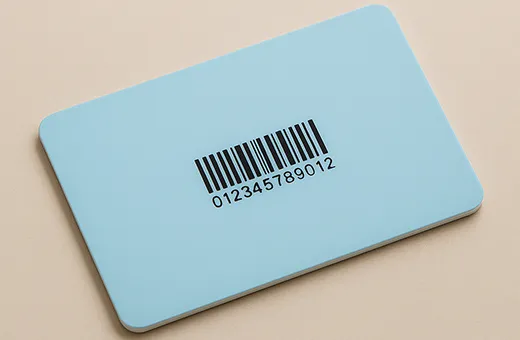
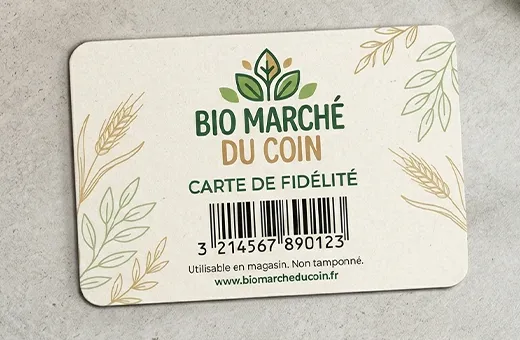
A barcode card is a PVC, paper or composite card carrying a printed graphic — a sequence of black bars (1D) or a square matrix of black modules (2D) — that encodes a string of data readable by an optical scanner. Unlike a magnetic stripe card or a smart card, the data is purely visual. There is no chip, no antenna, no magnetic medium — the data exists only as ink on the card surface.
That simplicity is the reason barcode cards remain so widely deployed. The encoding cost is the print cost. The reading cost is the scanner cost. The integration cost is whatever POS or CRM software you already run. No additional chip family to manage, no reader compatibility matrix to maintain, no encoding hardware in the production line — just print, scan, decode.
For a deeper look at the underlying PVC card material and how it is produced, see our guides on what PVC cards are and the custom PVC card printing process. For the paper card alternative, see PVC vs paper cards and our paper barcode loyalty cards product page.
3. Barcode standards explained (1D and 2D)
Two families of barcode encoding dominate B2B card production today: linear (1D) barcodes read by a laser or CCD scanner, and matrix (2D) barcodes read by a 2D imager or a smartphone camera. Each family contains several standards optimised for different data types and scanning environments.
3.1 EAN-13 (1D, numeric, 13 digits)
EAN-13 is the European standard for retail product identification — the barcode printed on virtually every consumer product in Europe. It carries exactly 13 numeric digits and is read by every laser scanner at every POS in the retail world. For loyalty programmes that want to ride existing retail infrastructure, EAN-13 is the path of least friction: the scanner already works, the POS already decodes the format, only the database lookup needs to be wired to your loyalty platform.
3.2 code 128 (1D, alphanumeric, variable length)
Code 128 is the workhorse for any 1D application that needs more than 13 digits, alphanumeric characters or a mix. It supports variable length (typically up to 48 characters in practical use) and full ASCII. Code 128 is widely used for member IDs, internal asset tracking, library codes and any application where the data structure includes both letters and numbers (member numbers prefixed with a programme code, for example).
3.3 QR code (2D, alphanumeric, up to ~4 KB)
QR is the dominant 2D barcode standard. Originally developed for automotive logistics, it became universal once smartphones gained native camera-based scanning. A QR code can carry up to ~4 296 alphanumeric characters (or about 7 089 numeric) — enough for a full URL, a JSON payload, a member token, or a multi-field record. Error correction is built in: up to 30% of the code can be damaged or obscured and the data still reads correctly.
3.4 data matrix (2D, compact)
Data Matrix is a more compact 2D format than QR, often used in industrial and pharmaceutical applications where the printed area is small. Less common on consumer-facing cards, but useful for internal identification programmes where the card body has limited real estate (asset tags, equipment tracking).
3.5 PDF417 (2D, larger payload, legacy)
PDF417 is the 2D format used on some ID documents and boarding passes — high capacity, but rectangular rather than square and requiring more reader sophistication than QR. Rarely chosen for new B2B card programmes today.
4. Which standard to choose for your project
| Use case | Recommended standard | Why |
|---|---|---|
| Retail loyalty card scanned at the POS | EAN-13 | Native compatibility with every retail POS scanner in Europe. |
| Member ID with alphanumeric data | Code 128 | Supports letters + numbers, variable length, still read by laser scanners. |
| Mobile app redemption (customer scans card with phone) | QR | Smartphones read QR natively; can encode a URL or a token. |
| Hybrid retail + mobile programme | EAN-13 + QR | Print both side by side; cover legacy POS scanners and smartphone workflows. |
| Internal asset / equipment tracking | Data Matrix or Code 128 | Compact for small printed areas, robust scan in industrial environments. |
| Library borrowing | Code 39 or Code 128 | Standard for library management systems (Koha, Aleph, Sierra). |
| Gift card balance lookup at the till | EAN-13 or Code 128 | Whichever your POS system already recognises for gift card SKUs. |
The fastest way to a clear answer is to identify which scanners and which software will actually read the card. Once the reading endpoint is known, the right barcode standard usually follows mechanically — and our team can validate the encoding against your existing software before production.
5. Printing specs that matter for readability
A barcode is a piece of machine-readable graphics. The print quality, the placement, the contrast and the size all affect read rates at the scanner. The following specifications are not aesthetic preferences — they are reading constraints derived from the ISO/IEC scanner standards.
5.1 contrast and colour
Barcodes must be printed in solid black on a white or very light background. Coloured backgrounds, gradients, textured stocks, dark logos behind the bars — these all degrade scanner read rates. The X-dimension (the width of the narrowest bar) must hold a clear 100% / 0% contrast against the substrate. Photographs, watermarks or any halftone graphic in the barcode area is a non-starter.
5.2 quiet zone
Every barcode requires a quiet zone — a clear margin of white space on each side (for 1D) or all four sides (for 2D) — free of any printed element. For EAN-13 and Code 128, the quiet zone is typically 10× the X-dimension on each side. For QR, the quiet zone is 4 modules on each side. Cutting the quiet zone short is one of the most common production errors and a frequent cause of "the scanner won't read it" tickets in retail rollouts.
5.3 size and x-dimension
A 1D barcode at standard X-dimension (0.33 mm) typically measures 30 to 50 mm wide for an EAN-13 and 25 to 40 mm wide for a 12-digit Code 128. A QR code at standard module size measures 15 to 25 mm square depending on payload. On a credit-card-size (ISO ID-1, 85.6 × 54 mm) substrate, this leaves plenty of room for branding around the barcode — but the barcode itself cannot shrink below the minimum scanner-readable size without compromising read rates.
5.4 lamination and finishes
Matte lamination over a barcode reads well. Gloss lamination can introduce reflective glare under POS lights and degrade laser scanner reliability — use matte over the barcode zone or specify a non-laminated barcode panel on otherwise-glossy cards. Spot UV varnish directly on the barcode is generally not recommended for the same reason. See our full finishes and customisation options page for the available finishing combinations.
5.5 resolution and ink density
Barcodes should be generated as vector elements (not raster images) and exported at 100% scale in the final file. Avoid enlarging or reducing barcode graphics in layout software — always regenerate at the final size. Ink density should be 100% black (K=100, C=M=Y=0 for offset / digital printing) — a mixed CMYK black can produce dot-gain that bleeds the bars into the quiet zone.
6. PVC vs paper barcode cards
Both substrates support barcode printing reliably. The choice between PVC and paper is driven by lifecycle, perceived value and environmental positioning — not by encoding requirements.
- PVC (0.76 mm, ISO 7810 ID-1) — the reference for daily-use, wallet-resident barcode cards: retail loyalty, gym memberships, library cards used over years. Durable, water-resistant, professional in-hand feel. See PVC loyalty cards.
- Paper (300-400 gsm coated or uncoated) — the right choice for short-cycle barcode cards: gift card promotions, seasonal campaigns, single-event member badges, recyclable loyalty programmes. See paper barcode loyalty cards.
- Composite / triplex paper (600+ gsm) — for premium short-cycle cards where paper is required for sustainability positioning but a wallet-grade feel is wanted. See paper cards range.
From a barcode-readability perspective, the substrate matters less than the surface finish. A matte-laminated PVC card, a coated 350 gsm paper card and a soft-touch triplex card all read equally well at the scanner. The decision is therefore about the card programme, not the encoding technology.
7. Variable data: unique barcode per card
Most B2B barcode card programmes need a unique barcode on each card — each member, each gift card balance, each asset gets its own identifier. This is variable data printing. The barcode graphic is generated card-by-card from a structured data file (typically a CSV or Excel spreadsheet) and printed inline with the rest of the card design.
The data file structure is straightforward: one row per card, one column per data field, one column for the barcode payload. Volumes typically range from 100 cards (the minimum order for most B2B programmes) to several hundred thousand cards for national retail rollouts. The encoding is verified on a sample run before the full production starts — typically the first 5 to 10 cards are read-tested against your specified scanner or against a reference scanner in our verification line.
For a deeper dive on the data preparation, common file formats, encoding edge cases and verification workflow, see our companion article on variable data card printing.
8. POS, CRM and app integration
The card is one half of the system. The other half — the scanner, the POS software, the CRM database, the mobile app — has to actually use the barcode payload. Three integration patterns dominate today.
8.1 POS-native integration
The barcode is recognised as a SKU or a loyalty token by your existing POS software (Cegid, Lightspeed, Square, Shopify POS, custom retail platform). The barcode is scanned at the till; the POS routes the payload to the loyalty engine or the gift card balance ledger. This is the simplest integration: no separate app, no mobile journey, the customer just hands the card to the cashier.
8.2 mobile-app integration (customer scans the card)
The barcode (typically QR) carries a URL or a token. The customer scans the card with their smartphone — opening your web app, a redemption page, or a deep link into your native app. This pattern is increasingly common in marketing campaigns, premium gift programmes, and any scenario where the digital customer experience extends beyond the in-store moment.
8.3 hybrid (POS + mobile)
Both endpoints on the same card. EAN-13 for the POS scan, QR for the smartphone scan, side by side on the back of the card. The two payloads can resolve to the same record server-side (consistent customer identity across channels) or to different systems (POS loyalty engine + marketing analytics platform). This is the most flexible pattern but also the most demanding on the data architecture.
9. Common pitfalls to avoid
- Quiet zone clipped by the card edge — barcodes placed too close to a card edge lose the mandatory clear margin. Keep at least 10× the X-dimension of clear space around 1D barcodes.
- Gloss lamination over the barcode — reflective glare under POS lights kills laser scanner read rates. Specify matte lamination or a non-laminated barcode zone.
- Coloured background under the bars — barcode contrast must be 100% black on white. No brand colours, no gradients, no photographic backgrounds inside the barcode area.
- Barcode rasterised at low resolution — always generate barcodes as vector and export at 100% scale in the final file. Scaling up a raster barcode introduces aliasing that breaks reads.
- EAN-13 with invalid checksum — the 13th digit is a checksum derived from the first 12. Generating EAN-13 numbers by hand without computing the checksum produces unreadable barcodes.
- QR code too small for the payload — long URLs need a larger QR module count and therefore a larger printed area. Always test the QR at the final size with a real scanner before approving the proof.
- Identical barcodes across cards by mistake — variable data printing requires careful CSV preparation. A duplicate row in the source file produces duplicate barcodes — caught by our pre-print verification, but worth confirming on your side.
- No verification of the scanner endpoint — the card may read perfectly in our verification line but fail on the customer's specific scanner if the scanner is misconfigured. Always test a few sample cards on your live POS before the full rollout.
10. Sector-specific use cases
10.1 retail loyalty programmes
The dominant pattern: EAN-13 or Code 128 on a PVC card scanned at the till by the existing laser scanner. The barcode points to a member ID in the loyalty database; the POS adds points or applies rewards in real time. See our retail industry page for the operational details.
10.2 gift cards
Gift cards use a barcode (EAN-13 for retail-grade SKU compatibility, Code 128 for alphanumeric voucher codes) printed on the back of the card. The barcode is scanned at activation (loading the balance) and at redemption (debiting the balance). For packaging that protects the barcode in transit, see our gift card packaging options. The full product range is on the PVC gift cards and paper gift cards pages.
10.3 membership cards (clubs, gyms, associations)
Membership barcodes typically use Code 128 (member numbers with letters and digits) or QR (when the redemption flow includes a mobile app). The card lifecycle is annual or multi-year, so PVC is the standard substrate. See our membership cards product page and the how loyalty cards work article for programme mechanics.
10.4 library cards
Library management systems (Koha, Aleph, Sierra, Symphony) typically read Code 39 or Code 128. The barcode is the persistent identifier across the catalogue. PVC is preferred for the multi-year lifecycle and daily handling.
10.5 student ID cards
Student cards often combine a barcode (library access, cafeteria) with a chip (campus access) on the same card — a multi-purpose identifier that consolidates several systems on one credential. See student ID cards and the education industry page.
10.6 events and corporate badges
Event attendee badges frequently use QR codes that resolve to the attendee record (badge scanning at sessions, lead capture by exhibitors). The badge is short-cycle, so paper or coated cardstock is the typical substrate. See our events industry page, and for corporate identification programmes see corporate card programmes.
10.7 beauty, hospitality and wellness
Spa visit cards, hair salon loyalty cards, restaurant reward cards — the encoding mix mirrors retail (EAN-13 for POS-native loyalty, QR for app-based redemption). Sector pages: beauty and wellness and hospitality.
11. Frequently asked questions
Are barcode cards still relevant compared to chip cards?
Yes — for the right use case. Barcode cards remain the dominant encoding for retail loyalty, gift cards, library cards and any application where the reader is a scanner and the data is non-sensitive. For secure access, payment or multi-application programmes, see our comparison of magnetic stripe and smart cards.
What is the difference between EAN-13 and code 128?
EAN-13 carries exactly 13 numeric digits and is the European retail product standard, recognised by every POS scanner. Code 128 carries variable-length alphanumeric data (letters + numbers + symbols), is read by the same laser scanners, and is the right choice when your member IDs or voucher codes are not purely numeric.
Can i print both a barcode and a QR code on the same card?
Yes, and it is a common pattern for hybrid programmes (POS scan + mobile scan). Print both on the back of the card, side by side, with sufficient quiet zones around each. The two payloads can resolve to the same backend record or to different systems.
How small can a barcode be on a card?
The minimum readable size depends on the scanner and the barcode standard. For EAN-13 at standard X-dimension (0.33 mm), the barcode measures roughly 30 mm wide and 22 mm tall — well within an ISO ID-1 card. QR codes at standard module size measure 15-25 mm square depending on payload. Going smaller than these benchmarks risks read failures at typical retail scanners.
Do i need special hardware to scan QR codes from cards?
No. Any smartphone camera reads QR natively, and modern 2D imagers at the POS read QR alongside 1D barcodes. Older 1D-only laser scanners do not read QR — if your POS infrastructure is 1D laser, stick with EAN-13 or Code 128 for the in-store scan.
Can each card carry a unique barcode?
Yes. Variable data printing assigns a unique barcode to each card from a structured CSV or Excel file you provide. Volumes range from 100 cards (minimum order) to several hundred thousand. The encoding is read-verified on sample cards before the full run. For details see variable data card printing.
Will gloss lamination affect barcode reading?
It can. Gloss lamination introduces reflective glare that degrades laser scanner read rates under bright POS lights. The safer choice for cards intended for daily POS scanning is matte lamination over the barcode area (or non-laminated barcode panel on otherwise-glossy cards). See our finishes and customisation options.
How fast can a barcode card project be produced?
PVC barcode cards typically ship in 6 to 10 working days for standard production (8 to 10 with variable data); shorter lead times may be possible on eligible specifications depending on the production schedule. Paper barcode cards run faster (4 to 6 working days standard). See our delivery times page for the canonical schedule by product family.
12. Next steps
The decision path for a barcode card programme is short:
- Identify where the card will be scanned (POS, smartphone, both).
- Choose the barcode standard that matches the reading endpoint (EAN-13, Code 128, QR, hybrid).
- Choose the substrate that matches the card lifecycle (PVC for daily use, paper for short-cycle).
- Prepare the variable data file (CSV or Excel) if each card needs a unique code.
- Share the spec with our team for a tailored quotation — typically returned within one business day.
Related articles
- Variable Data Card Printing: From CSV to Card
- Magnetic Stripe vs Smart Cards: Differences That Matter
- What Is a Smart Card? Chip Cards Explained
- Secure Card Printing: Options to Prevent Counterfeiting
- How Loyalty Cards Work: Mechanics & Best Practices
- PVC Cards vs Paper Cards: Which Material to Choose?
- Custom PVC Card Printing: The Complete Guide
- What Are PVC Cards? A Complete Introduction
Talk to a custom card specialist
Ready to launch your barcode card programme?
Share your scanning endpoint, your data structure and the volume — we will return a tailored quotation with the right barcode standard, substrate and finishing combination, validated against your reader specifications.