
Card technology · 12 min read
Variable data card printing: from CSV to card
Variable data printing turns a flat artwork file into a personalised batch of cards where every card carries unique information — a member number, a name, a photo, a barcode, an encoded chip identifier. This guide walks through the full workflow: how to prepare a clean CSV, what you can vary on a card, the verification process and the most common pitfalls to avoid before launching a large run.
1. Short answer: what variable data printing is
Variable data printing (VDP) is the process of producing a batch of cards where each individual card carries unique printed or encoded data — typically pulled from a spreadsheet or database with one row per card. The card design stays constant; only the variable fields change from one card to the next.
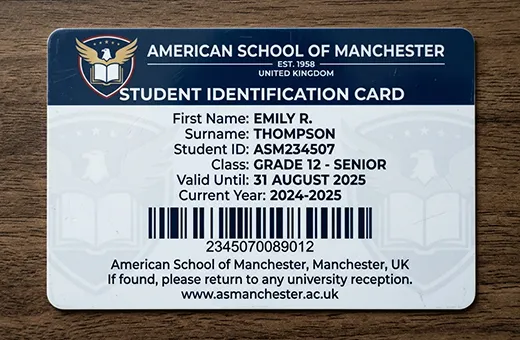
Most professional card programmes involve some form of VDP. A loyalty card with a unique member number; a student ID with a photo and a chip identifier; an ID badge with the holder's name and department; a gift card with a unique activation barcode — all variable data outputs of the same generic design.
The deliverable from your side is a structured data file. The deliverable from our side is the printed batch, verified before dispatch.

2. What VDP actually does on a card
On a static print run, the same plate prints every card identically. On a variable data run, the press combines a constant background (logo, brand layout, fixed text) with a dynamic layer pulled from your data file. The two layers are merged card-by-card during the print pass — typically through digital presses or hybrid digital/offset workflows that can switch the variable content at each impression.
The same logic applies to encoding. A magnetic stripe, an NFC chip or a barcode can each carry data that varies per card. The encoding hardware in the production line writes the unique payload from the data file onto the corresponding card body, in sync with the matching printed elements (so the printed member number matches the encoded chip UID, for example).
For the underlying card printing process, see our companion guide: custom PVC card printing — the complete guide. For the encoding technologies themselves, see magnetic stripe vs smart cards, what is a smart card and barcode cards for business.
3. What you can personalise on each card
The variable fields fall into five families. A single card programme often combines several.
3.1 printed text fields
Member name, employee title, department, location, joining date, membership tier, validity period, language code. Printed in the same brand typography as the static layout — the variable text simply replaces a placeholder block. Field length must fit the reserved area on the card (long names, accents, special characters all need to be tested at proof stage).
3.2 printed numbers and serialisation
Member numbers, employee IDs, student numbers, sequential codes, activation codes. The number can be a simple counter (00001, 00002...), a structured code (programme prefix + region code + sequence), or a fully randomised payload pulled from your system. The print format (zero-padded, dash-separated, prefixed with a letter) is part of the layout decision.
3.3 printed barcodes and QR codes
A unique barcode or QR code per card — EAN-13, Code 128, QR, depending on the scanner endpoint. The barcode is generated card-by-card from the corresponding row in your data file and printed inline with the rest of the design.
3.4 printed photos and signatures
Personalised photo IDs (student cards, employee badges, member cards with photo) reference a per-row image filename in your data file. The image folder is uploaded alongside the CSV. Photos should be supplied at minimum 300 dpi at the printed size, on a consistent background (white or brand-colour) for batch consistency. Signatures follow the same pattern but typically as black-on-white PNG.
3.5 encoded data on stripe, chip or NFC
Variable data is not limited to what is printed — it extends to what is encoded. Each card can carry a unique magnetic stripe payload (ISO 7811 tracks 1, 2, 3), a unique chip UID or written sector, or a unique NFC URL. The encoded payload is written by the inline encoding hardware from the data file, typically synchronised with the matching printed fields. See our magnetic stripe cards and smart cards product pages for encoding specifications.
4. The data file: structure and format
The variable data file is the bridge between your records and the print run. Almost every B2B card project uses one of three interchange formats, with CSV being by far the most common.
4.1 CSV (the standard)
A plain-text comma-separated values file with one row per card and one column per data field. The first row contains the column headers (member_id, full_name, email, photo_filename, barcode_payload...). The encoding should be UTF-8 with BOM if the file contains accents — this avoids the classic "François" → "François" mojibake on Windows.
4.2 excel (.xlsx)
Functionally equivalent to a CSV but with native support for column types, formulas and a richer review experience in Excel itself. Only the first sheet is processed; rows must start at row 2 (row 1 is headers). Hidden columns and merged cells should be unhidden / unmerged before sending — they are a frequent source of pre-print friction.
4.3 JSON or XML
Used when the data export comes from an API or a content management system. Less common for one-off batches but useful for recurring rollouts integrated with your HR, CRM or membership system. The structure should map cleanly to a flat row-per-card schema — nested objects need to be flattened before printing.
4.4 photo / signature folder
If your cards include personalised photos, the images are supplied in a separate folder alongside the CSV. Each image filename
must match the corresponding row's photo_filename column exactly. Common formats: JPG or PNG at 300 dpi for the
printed size (typically 300×400 px for a passport-style photo on a credit-card sized card).
5. Preparing your CSV step by step
A clean data file saves time, prevents reprints and removes ambiguity from the proof phase. The following checklist covers the steps that catch the most common issues before the file leaves your side.
5.1 define the schema first
Before exporting, list the columns you actually need on the card: name, member ID, barcode payload, photo filename, validity
date, tier, language. Each column corresponds to one variable element on the card layout. Removing unused columns and renaming
ambiguous ones (id → member_id) reduces the back-and-forth at proof stage.
5.2 normalise text fields
Apply consistent casing (Title Case for names, UPPERCASE for codes), strip leading/trailing whitespace and collapse
multiple spaces. A name like " jean-luc PICARD " should arrive in the file as "Jean-Luc Picard".
Inconsistent casing is fine for sortable lookups but reads badly on a printed card.
5.3 validate field length
Each printed area on the card has a maximum length (e.g. 22 characters for a name printed at the layout font size). Rows that exceed the limit will either truncate, overflow into adjacent areas, or shrink the font size unevenly. Identify the longest value in each column before exporting and confirm it fits the reserved space.
5.4 check uniqueness where it matters
Member IDs, employee numbers, barcode payloads, chip UIDs — these must be unique per row. A duplicate row in the source file produces two cards with the same identifier, which can cause silent collisions in your back-end system. Use Excel's Highlight Duplicate Values on the unique columns before exporting.
5.5 confirm barcode payload validity
For EAN-13 barcodes, the 13th digit is a checksum derived from the first 12. Generating EAN-13 numbers by hand without computing the checksum produces unreadable barcodes. Code 128 has no checksum constraint but cannot contain characters outside the supported ASCII range. The pre-print verification catches this — but it is faster to validate upstream.
5.6 match photos to rows
Confirm that every row referencing a photo_filename has a corresponding image in the folder, with the exact same
spelling (case-sensitive on most production systems). Orphan rows (no photo) and orphan photos (no matching row) are the most
common source of pre-print holds on photo ID programmes.
5.7 save as UTF-8
Save the final CSV as UTF-8 with BOM. Excel's default "CSV (Comma delimited)" on Windows uses Windows-1252 encoding, which breaks accented characters in modern production pipelines. Use "CSV UTF-8 (Comma delimited)" in the Save As dialog, or export from a database with explicit UTF-8 encoding.
6. The production workflow (file to finished card)
From the moment your CSV arrives to the moment the cards leave the dispatch dock, the workflow runs through five distinct stages. Each stage has its own verification step before the next begins.
6.1 file intake and review
The data file is received over a secure channel, the row count is confirmed against your order, encodings are checked, and the schema is mapped against the placeholder fields in the artwork. Any structural issues (empty mandatory fields, inconsistent types, encoding errors) are flagged at this stage. Photo folders are scanned to confirm every referenced file is present.
6.2 sample card composition
A representative sample of cards — typically 3 to 10 rows covering the longest names, edge cases and special character — is composed digitally and sent back as a proof PDF. This is the moment to catch overflow, casing inconsistencies, photo crop issues or barcode rendering problems before the full run.
6.3 proof sign-off
You approve (or request adjustments to) the sample composition in writing. No production starts before sign-off. For larger programmes with multiple stakeholders, the proof can include both a PDF for visual approval and a CSV mock-export to confirm the field mapping is correct end-to-end.
6.4 full run printing
The press composes each card from the constant layout plus the row-specific variables, in the order of the CSV. Encoding (if applicable) is written inline by the encoding hardware. The output is a continuous sequence of finished, personalised cards in the same order as your data file — which makes the post-production sorting trivial if you need to dispatch the cards in alphabetical or regional order.
6.5 quality control and packing
Print sharpness, encoding read-back (for chips and stripes), barcode read-back (for barcoded cards) and photo placement are checked on a sample of cards across the run. Cards are then sorted and packed according to the dispatch instructions — alphabetical, by branch, in welcome packs, or as a single bulk delivery.
For canonical lead times by product family, see our delivery times page. For the standard custom printing workflow without VDP-specific elements, see custom card printing services.
7. Verification before the full run
The proof stage is the single most important checkpoint of a VDP project. A clean proof catches errors that would otherwise multiply across the full run.
- Sample selection — the proof includes rows chosen to stress-test the layout: longest name, special characters (accents, hyphens, apostrophes), corner-case fields (empty optional columns, edge dates, maximum-length codes).
- Visual check — every variable field on the proof is verified character-by-character against the source CSV row. Photo crop, font alignment, barcode rendering and date format are all in scope.
- Encoding check — for cards with stripe, chip or barcode encoding, sample cards are read against reference equipment to confirm the encoded data matches the printed data.
- Cross-row consistency — the proof verifies that the field-mapping logic is consistent across the sample (e.g. all member IDs print in the same position, no offset drift between rows).
Approval on the proof is final for the production run. Any adjustments after sign-off require a new proof cycle and reset the production schedule.
8. Common pitfalls to avoid
- Encoding mismatch (UTF-8 vs Windows-1252) — accented characters arrive corrupted in the production pipeline. Always export as UTF-8 with BOM.
- Hidden columns and merged cells in Excel — they are invisible in the visual review but disrupt the row-to-field mapping. Unhide and unmerge before sending.
- Duplicate rows on the unique column — produces duplicate cards with the same identifier. Run a duplicate check before exporting.
- Photo filenames with spaces or special characters — file-system-incompatible filenames break the photo-to-row mapping. Rename to lowercase, dash-separated, ASCII-only.
- Mixed casing in supposedly canonical fields — "Smith", "SMITH" and "smith" produce visually inconsistent cards. Normalise before exporting.
- EAN-13 without a valid checksum — produces unreadable barcodes. Compute the 13th digit programmatically or use a generator.
- Field-length overflow — names or codes longer than the reserved area on the card. Audit the longest value in each column before approving the layout.
- Stale data export — exporting from the source system days before sending — recent member changes (new joiners, deletions) are missed. Export as close to file delivery as possible.
- No proof review of edge cases — the sample proof must include the longest, the shortest, the accented and the special-character rows. Reviewing only "nice" rows leaves the edge cases undetected.
- Last-minute schema changes after sign-off — adding or renaming a column after the proof is approved requires a new proof cycle and resets the schedule. Lock the schema before sign-off.
9. Volumes, minimums and lead times
Variable data printing scales from small dedicated runs (100 cards for a private members' club) to large rollouts (tens of thousands of student IDs at a new academic year, or full enterprise badge replacements). The per-card cost on a VDP run is essentially the same as a static run — the variable element is part of the digital print pass, not an additional process step.
- Minimum order — typically 100 cards per project. Below that volume, the proof and setup time dominates the run economics.
- Mid-volume runs (100 to 5 000 cards) — fit comfortably in standard lead times. PVC cards in 8 to 10 working days, paper cards in 4 to 6 working days from sign-off.
- Large rollouts (5 000+ cards) — typically scheduled with a planning window that aligns the data export with the production calendar. For seasonal peaks (back-to-school for student cards, year-start for corporate badges), the run is reserved several weeks in advance.
- Tight deadlines — shorter lead times may be possible depending on the production schedule. The clean CSV must be ready on day one — there is no slack in the proof cycle for an accelerated run.
For the full delivery schedule, see our delivery times page.
10. Sector-specific examples
10.1 retail loyalty programmes
Each card carries a unique member ID encoded as a barcode (EAN-13 or Code 128) and printed on the back. The CSV is exported from the loyalty platform — one row per member, columns for the member ID and the barcode payload. The barcode is the bridge to the POS scan. See our retail industry page.
10.2 student ID cards
Each card carries the student photo, name, student number, year of enrolment and a chip UID for campus access. The data file comes from the student information system; the photo folder is exported in parallel. Volumes typically peak around the start of the academic year. See student ID cards and the education industry page.
10.3 corporate employee badges
Each badge prints the employee name, title, department, photo and a chip UID for building access. The data file is exported from the HR system. For multi-site organisations, the badge can also include a site code that maps to a corresponding access profile. See identification badges and the corporate industry page.
10.4 membership cards (clubs, associations, gyms)
Each card prints the member name, tier (Classic / Gold / Platinum), validity date and a unique member ID encoded as a barcode or QR. The data file comes from the membership management platform. See membership cards and our companion article on how loyalty cards work.
10.5 gift card programmes
Each gift card carries a unique activation code encoded as a barcode. The data file is generated by the gift card platform — one row per card, one activation code per row. The code is scanned at the till to load the balance and again to redeem it. See PVC gift cards and paper gift cards.
10.6 event badges
Each attendee badge prints the attendee name, organisation, role (speaker / attendee / staff / VIP) and a unique QR code that resolves to the attendee record. The CSV is exported from the event registration platform. Production is timed to follow late registration close. See our events industry page.
10.7 hospitality VIP and key cards
Hotel VIP cards print the guest name and tier (Member / Silver / Gold / Platinum) for premium loyalty programmes. Magnetic-stripe encoded room keys are typically not VDP-printed but VDP-encoded on demand at the property — a different operational pattern. See hospitality industry page.
11. Frequently asked questions
What file format should i send the data in?
CSV is the standard, encoded as UTF-8 with BOM. Excel (.xlsx) is also accepted — only the first sheet is processed, with row 1 as headers and no merged cells. For API-driven exports, JSON or XML are accepted provided the structure flattens cleanly to row-per-card.
How are personalised photos handled?
Photos are supplied in a separate folder alongside the CSV. Each image filename matches the corresponding row's
photo_filename column. Recommended specs: JPG or PNG, 300 dpi at the printed size (typically 300×400 px for a
passport-style photo), consistent background colour across the batch.
Can the data file include sensitive information?
Yes, under appropriate handling. For programmes involving personal data (names, photos, employee or student IDs), the workflow is GDPR-compliant: data is transferred over secure channels, accessed only by the production team, and not shared with third parties. For programmes with very sensitive content, a DPA is signed before the order is processed.
What if my CSV has a few problematic rows out of thousands?
Problematic rows (overflow, missing photos, invalid barcode payload) are flagged at the file intake stage and reported back to you for correction. The production does not start until the file is clean. For very large rollouts, problematic rows can be extracted into a separate "exception" batch and the main run can proceed once the bulk of the file is validated.
Can i order one personalised sample card before committing to a full run?
A sample card production for a single physical card is generally not practical (the setup cost dominates the per-card cost dramatically at quantity 1). The proof PDF — which composes 3 to 10 representative rows digitally — serves the same purpose at a fraction of the lead time.
Can the variable data include foreign-language characters and accents?
Yes. The production pipeline supports the full Unicode range. Names with accents, umlauts, eszett, cedilla, tildes and most Latin-based scripts print correctly provided the source file is UTF-8 encoded. Right-to-left scripts (Arabic, Hebrew) and CJK (Chinese, Japanese, Korean) are also supported on request — confirm at quote stage.
Can the variable data drive both print and encoding from the same file?
Yes. The CSV can carry columns for printed fields (name, member ID, tier) and encoded fields (barcode payload, chip UID, magnetic stripe tracks) in parallel. The production pipeline synchronises the printed and encoded fields card-by-card, so the printed member ID always matches the encoded chip data on the same card.
12. Next steps
The decision path for a variable data card project is short:
- List the variable fields you actually need on the card (name, member ID, photo, barcode, encoded payload).
- Identify the source system from which the data will be exported (CRM, HR, loyalty platform, student information system).
- Prepare a clean CSV against the schema, normalised, deduplicated and saved as UTF-8.
- Share the spec and a sample of the data with our team for a tailored quotation and a sample proof.
- Sign off the proof, run the production, receive the verified batch within the lead time.
Related articles
Talk to a custom card specialist
Ready to run your variable data card project?
Share the variable fields you need, the source of your data and the volume — we will return a tailored quotation, a sample proof on representative rows and a clear production schedule, typically within one business day.